Showing posts with label 3D Animation. Show all posts

Thursday, September 25, 2014

The Amazing Spider Man 2 VFx Breakdown Full

VFX Breakdown of The Amazing Spider-Man 2


MPC Vancouver teamed up with Director Marc Webb and Sony Pictures Imageworks VFX Supervisor Jerome Chen to complete more than 300 shots for The Amazing Spider-Man 2.

Led by MPC’s VFX Supervisor Erik Nordby and Producer Doug Oddy, the team’s main areas of work included three electrifying sequences: Max Dillon falling into a tank of mutant electric eels and beginning his transformation into Electro; Harry Osborn’s vein bulging transformation into the Green Goblin; and an explosive aircraft collision.  MPC was also responsible for building several New York City environments and various Oscorp building environments and set extensions.


The first sequence undertaken by the MPC team was the Oscorp building elevator sequence, in which Spider-Man’s true love, Gwen Stacy, first meets Max Dillon, the Oscorp engineer who is later transformed into Electro. The scene was shot in a glass elevator, set against a green screen, with the outside environment and background activity created by MPC’s team. They created 90 unique floors at 6k resolution, including offices, labs, and lobbies utilizing MPC’s in-house crowd software to create the employees walking around the building.

A key turning point in the movie is Max’s transformation into Electro after he falls into a tank of electric eels. For this scene, MPC used footage of a stuntman falling into the tank for the impact, and close-up references of Jamie Foxx’s face, and then roto animated a digital double of Foxx in the tank. CG electric eels were created and blended with electricity effects, bubbles and froth.

The team created 30 different eels from reference footage collected at the Vancouver Aquarium, adding extra facial and personality features to make them appear more aggressive and enforce the feeling that they are not typical eels. The animation team animated the creatures biting and wrapping around Max, transferring their energy into him.

The build up of electricity shatters the glass of the tank, which was filmed on set, and MPC added CG water effects to enhance the sequence, as well as adding the eels that pour out of the tank with Max. For the last few shots of the scene, Max is a full CG model.

For Harry Osborn’s transformation into the Green Goblin, the actor’s body was roto animated and pulsing veins were added, along with animated growing nail and teeth.

MPC also created the sequence in which a Boeing 747 and an Airbus collide after Electro drains the power supply, leaving the city in darkness. This included developing special day-for-night techniques to light the planes and surrounding city shots. The environment team spent over two months creating a highly detailed matte painting of New York, referencing real photos of the city at different times of the day, and then projecting the city’s buildings onto geometry.

The Amazing Spider-Man 2 breakdown by Sony Pictures Imageworks


Behind the Scenes at Weta Workshop


Read The Full Story - http://bit.ly/Yfwk4G


Monday, September 22, 2014

World War Z VFX breakdown

World War Z VFX breakdown


Creating Zombie Crowds and environments


Lead by MPC VFX Supervisor Jessica Norman, the team completed more than 450 shots, under the guidance of Scott Farrar, the Production VFX Supervisor. MPC’s main areas of work were creating the Zombie hordes in Jerusalem, the plane crash sequence, the Wales Sequence and the Epilogue.

Get VFx Training Today:   http://bit.ly/ZEOmi6


Friday, September 19, 2014

Prince of Persia: The Sands of Time VFX breakdown video

Prince of Persia VFx breakdown


Prince of Persia: The Sands of Time VFX breakdown video

MPC was involved from pre-production to create the mystical city of Alamut and the Golden Palace in Mike Newell's video-game adaptation, 'Prince of Persia: The Sands of Time'. Once the concept was signed off, the CG city was built using 20,000 buildings and 180,000 props.  To achieve this, a layout tool would randomly distribute a series of different building types based on a grid structure.  Separately, a packaging tool would add 60 different types of props, including washing lines, trees, piles of wood and pots. This tool would also allow the artists to make any adjustments needed.
MPC was also responsible for creating CG armies for the siege sequence which were simulated using MPC’s proprietary crowd system; Alice.  For some of the shots over 10,000 agents were used, including soldiers with flags, citizens, horses and camels.
Create Mind Blowing VFx, Register Today

Thursday, September 18, 2014

Wrath of the Titans VFX breakdown

Wrath of the Titans VFX breakdown


MPC VFX Supervisor Gary Brozenich and Producer Oliver Money led MPC’s team delivering 280 shots for the movie. MPC’s main areas of work included; the opening Dream Sequence, the Chimera attack, the final battle with Kronos, the Makhai warriors and Pegasus, as well as the Gods dying and dissolving, full CG temples, set extensions and a number of stunning DMP’s throughout.

Get Advanced VFx Training Get Registered Today


3D Animation Courses in Bangalore

Arena Animation Basavanagudi


We are the best Multimedia training institute in Bangalore, and we are known for Industry based training. We provide 3D Animation Courses and Visual Effects ( VFx ) Training with the latest and advanced training technologies in the Multimedia market. We also provide Placements in Reputed and Well-known Graphics and Multimedia industries.We also Provide Web and Graphic Designing with HTML5 and CSS3 which is one of the best Industry Based Training.

Placement Assistance


Our students are placed with some of the top studios, production house, advertising agency,  & corporate organizations in the industry Apart from technical training & project work, Arena Animation prepares you for a career in  the animation, VFX & gaming industry. We provide regular job and recrutiment sessions to  train our students for job interviews. Students also benefit from placement workshops,  Orbit Live, Creative Minds, Perspectives, job fairs/campus placements & more...!


Get Registered now for Better Experience in Animation and Multimedia


HOW TO INSTALL PLUG-IN FILTERS IN PHOTOSHOP

Among the most popular questions asked by newbies about Adobe Photoshop compatible plugins are:
Where do I install a plugin and how do I load it afterwards?
A plugin (or plug-in) is a computer program that integrates into another program adding new features and increasing functionality. Adobe lets you install plug-in filters from other software developers in its programs.
Some Photoshop compatible plugins have an installer that will guide you through the process.
But what should you do if plug-ins are not added in Photoshop?
How to install these files? It's as easy as pie.
All you need to do is to copy (or drag) the file into the Plug-Ins sub-folder of the Adobe Photoshopfolder.
The Adobe folder is typically located in Program Files on Windows and in Applications on Mac OS X.
If you have installed Photoshop in any other location you should look for the Plug-Ins folder there.
bear in mind that Photoshop must be closed when installing new plugins. Or you will need to restart the editor.
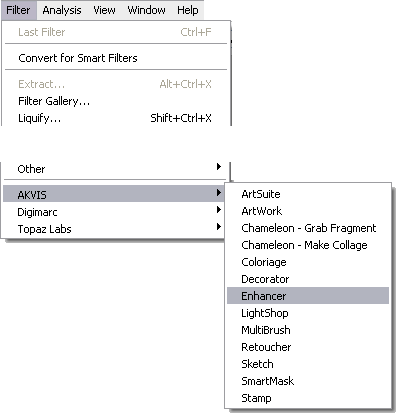
Next time you run Photoshop, the plugins will be available in the menu Filter:
Some Useful Tips:
  • Photoshop recognizes plug-ins located in subfolders and subdirectories inside the Plug-Insfolder.
    You can classify your filters by developer or by task. Just create a new folder inside the Plug-Ins folder and put the files in it.
    However, the list of plugins in the Photoshop menu (under Filter) looks different from the list in the Plug-Ins folder. In the Photoshop menu plug-ins are usually classified by developer.
  • Photoshop also recognizes shortcuts (Windows) and alias (Mac OS) within the Plug-Ins folder and subfolders.
    Install your plug-in filters into any folder outside Photoshop, and then create a shortcut for the ".8bf" file (or "make alias" on Macintosh) and place it into the Plug-Ins folder.
    With shortcuts you can manage your plugins quickly and safely.
  • You can select an additional plug-ins folder in Photoshop Preferences.
    Call the command Edit on Windows or Photoshop for Mac OS, then -> Preferences -> Plug-ins & Scratch Disk.
    Select Additional Plug-ins Folder, then use the button Choose to select a folder or directory from the list.
    Attention!
    If you select the Additional Plug-ins Folder in Photoshop 32 bit, make sure that the folder does not contain the 64 bit files (64-bit version of the plugin), otherwise you will get an error message!
Note:
Some filters show up directly in the main Photoshop menu (typically between "Windows" and "Help" titles).
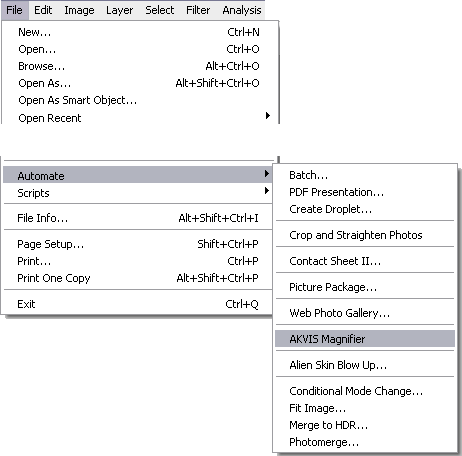
Some plugins (which change size of images) appear in the menu Automate, for example, the Magnifierplugin:
File -> Automate -> AKVIS Magnifier.


See the video how to install a plugin in photoshop


Learn More


Tuesday, September 16, 2014

Animating Godzilla at MPC using Autodesk Maya

Animating 

Godzilla 

at MPC using Autodesk Maya


Take a look at a sneak peak from our VFX breakdown for Godzilla!

Ferran Domenech an animation supervisor at MPC talks about the efforts to animate Godzilla in the latest remake of this iconic creature.

Want to learn 3D Animation and VFx?

Join AAIP NOW and explore the VFx Production Level Art

Monday, September 15, 2014

VFx Short Film - CGBros

The Gift - A Sci-Fi Short Movie by BLR VFX


Directed by Carl E. Rinsch, 'The Gift' Belongs to the "pararell Lines" Phillips Cinema campain. Placed in Russia, The Gift is a Sci-Fi short with a savage Chase sequence on it. We made more than 20 full CGI shots for the short. Check out the animated pictures to see how it has been done. We also made the vehicles and some characters desingns. We enjoyed creating such an unusual atmosphere and sense. Not the regular Sci-fi film we are used to see...


Get Trained and Make VFx short films 


Friday, September 5, 2014

Arena Animation Basavanagudi


ARENA ANIMATION BASAVANAGUDI

3D Animation, Graphic, Web Design Training Center


We are the best Multimedia training institute in Bangalore, and we are known for Industry based training. We provide 3D Animation Courses and Visual Effects ( VFx ) Training with the latest and advanced training technologies in the Multimedia market. We also provide Placements in Reputed and Well-known Graphics and Multimedia industries. We also Provide Web and Graphic Designing with HTML5 and CSS3 which is one of the best Industry Based Training.